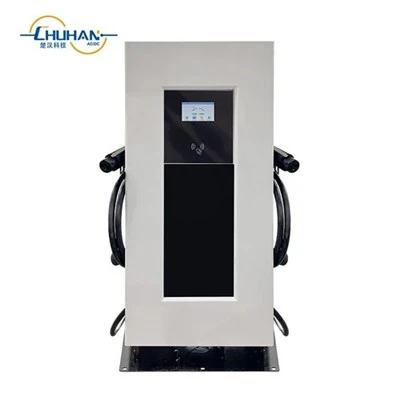
A charger can leave the factory with the right connector and the right power class, and still be awkward to use on day one. The usual failure is not the gun. It is access: the homeowner cannot start a session from the app, the workplace has no RFID cards, or the depot expected a backend that was never specified on the purchase order. Access is a site policy. It should be written down before the packing list is closed.
This is a different question from the connector standard, and from whether the site needs an AC wallbox or a DC dresser. Those choices still matter. They do not replace a decision about who is allowed to start a charge, and on what system.
Treat access as a site rule, not an optional tick box
Ask, in one sentence, how a driver will be allowed to start a session. Typical answers are: an app on a phone, an RFID card, or a network backend that talks to the charger. Some sites want two of those. Very few sites are happy to decide after the container has landed.
On the CHUHAN English catalogue, the access tools already appear on public product pages - but they are not interchangeable just because several words sit in the same brochure:
- The 22 kW three-phase Type 2 AC wallbox (32 A, indoor or outdoor, 4.3-inch LCD) is listed with app control and 4G / WiFi / Bluetooth. Features described on the listing include timed charging and RFID in the app interface. The same series graphic also lists 7 kW and 11 kW single-gun options.
- The ACT-DC-160SH is a 160 kW dual-gun DC fast charger with a 200–1000 V output. The listing describes OCPP, and other public wording refers to RFID and app control, plus a 7-inch touch screen on the outdoor cabinet.
- The 60 kW / 65 kWh all-in-one DC charger with integrated storage is listed with RFID, app, and OCPP control.
"App" on a home wallbox and "OCPP" on a depot charger are not the same work for the installer. The first is usually a local or mobile setup for one household or a small workplace. The second is a decision about which charging-management platform the site will use, and whether the charger must join it on day one.
Home and small workplace: lock the app and RFID plan
For a driveway or a small staff car park, start with the AC wallbox family and write down how people will start a session.
A practical scene: a house that already has a hybrid inverter and a 51.2 V battery, and that wants a 7 kW single-phase wallbox, can often live on the app plus a simple timed schedule. A small office with a handful of employees may prefer RFID so that a guest cannot start a session from a phone they do not have. If the same workplace also wants a 22 kW, 32 A three-phase Type 2 unit, confirm that the board is three-phase before you talk about cards or apps. Access does not fix a phase mismatch.
Do not leave "RFID optional" or "app to be confirmed" on the packing list. If cards are required, say how many, and who will issue them. If the app is the only method, say who will be invited to it after commissioning.
Public sites and depots: lock the backend before the power class
For commercial parking, a public charging bay, a bus depot, or a fleet yard, the access question usually comes back as OCPP plus a local fallback.
The ACT-DC-160SH is already described for those scenes - commercial parking, public charging, bus depots, and fleet operation - with OCPP on the listing. A fleet manager who already has a backend should name that system on the enquiry, and should say whether RFID or the cabinet screen is the backup when the network is down. A site that has no backend yet still needs a written plan: local RFID and screen only, or a platform to be connected later. "We will sort OCPP after installation" is how a 160 kW cabinet sits unused while two companies argue about accounts.
If the grid connection is tight, a storage-coupled unit may be the better power architecture. The 60 kW / 65 kWh all-in-one, and the larger liquid-cooled ACT-DC-186kWH+120kW or ACT-DC-261KWH ESS+160KW stations, still inherit the same access decision. Adding a battery does not decide who may plug in.
What to send with the enquiry
When you ask CHUHAN to help specify a charger, include:
- The site type: home driveway, workplace, public parking, or depot / fleet
- How a session must start: app, RFID, OCPP backend, cabinet screen, or a stated combination
- Whether RFID cards must ship with the order, and how many
- The connector plan (Type 2, CCS, or GB/T) and whether the unit is AC or DC
- Single-phase or three-phase supply, and whether storage will sit in front of the charger
- Who will operate the system after commissioning - a homeowner, a site manager, or a charging platform
CHUHAN manufactures AC wallboxes, DC fast chargers, and storage-coupled charging stations in our factory in Yueqing, Zhejiang. If you lock the access method with the connector and the power class, we can help you ship a charger that the site can actually put into service.
Website: https://www.chinachuhan.com/ Email: sales03@chinachuhan.com WhatsApp: +86 189 6895 8968