


Electric vehicles (EVs) are rapidly becoming the go-to choice for modern families, valued for their eco-friendliness, cost efficiency, and smart technology. Whether in your home garage, apartment parking lot, or a local shopping center, Level 2 AC charging stations are the backbone of everyday EV charging. But like any tech, they can occasionally glitch-leading to slower charging, safety risks, or even damage to your vehicle if ignored. Don't worry: most issues are simple to fix with basic know-how. This guide breaks down common AC charging station problems, quick fixes, and easy maintenance tips to keep your EV adventures stress-free. Let's dive in!
Common AC Charger Issues & Quick Fixes
1. The Charging Cable is Stuck (Can't Plug In or Unplug)
The Symptom: The charging connector is jammed, locked, or simply won't budge.
How to Fix It:
Check the Locking Mechanism: First, ensure the charging session is fully stopped via your app, RFID card, or vehicle key. If it's still stuck, look for the emergency release tab on the charging connector (usually a small hole or pull-cord). Pro tip: Check your user manual for the exact location.
Mind Your Technique: Always push the connector in until you hear a solid click. Never force it out while the vehicle is still actively charging.
Software Glitch? Sometimes, a simple reboot does the trick. Try restarting both the charger and your vehicle, then try again.
2. Charger is Unresponsive or Won't Start
The Symptom: You plug in, but the screen stays blank, lights are off, or the session simply won't initiate.
How to Fix It:
Check the Power: Verify that the main power switch is ON and the circuit breaker hasn't tripped.
The Emergency Stop Button: Did someone accidentally hit the big red button? Give it a clockwise twist to reset it.
Dirty Contacts: Dust or debris can block the connection. Unplug, inspect the connector for dirt, wipe it clean, and plug it back in firmly.
3. Charging Stops Unexpectedly
The Symptom: The session halts mid-charge, often accompanied by an error code.
How to Fix It:
Overheating Protection: High-power charging in hot weather can trigger thermal protection. Check if the charger's ventilation slots are blocked and let the unit cool down before restarting.
Battery Status: If the battery is full, stopping is normal. If it stops at a low percentage, check your vehicle's Battery Management System (BMS) for error messages.
Power Fluctuations: Unstable grid voltage can interrupt charging. If this happens frequently, consider a voltage stabilizer or contact your local utility provider.
4. Inaccurate Display Readings
The Symptom: The charger's screen shows different time or energy (kWh) readings than your car's dashboard.
How to Fix It:
Reboot the charger to sync the internal clock. If the discrepancy persists, contact customer support for a software update or calibration.
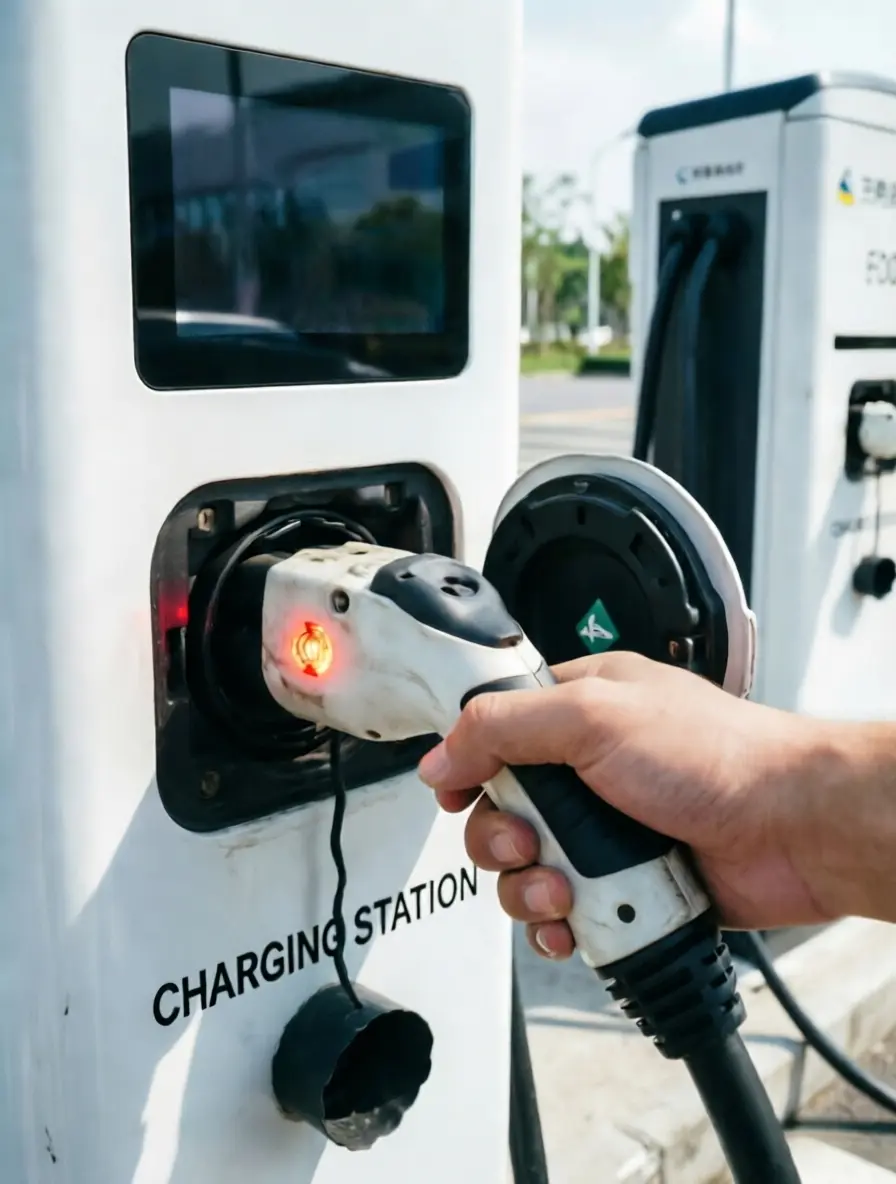

5 Habits to Extend Your Charger's Lifespan
1.Monthly Visual Inspections: Check the enclosure for cracks, rust, or physical damage. Inspect the cable for fraying or exposed wires.
2.Keep It Clean: Wipe the connector and vehicle port with a dry, soft cloth. Moisture, dust, and metallic debris are the enemies of a good connection.
3.Be Gentle: Always hold the connector body when plugging/unplugging. Never yank the cable, and never move the vehicle while it's plugged in.
4.Weatherproofing: If installed outdoors, ensure your unit has at least an IP54 waterproof rating. Keep indoor units ventilated and away from heat sources.
5.Routine Testing: Once a month, run a full charge cycle to ensure everything works smoothly. Keep a log of any weird noises, heat, or error codes to share with technicians if needed.
Safety First: Golden Rules
Inspect Before Plugging: Ensure both ports are bone-dry. Never handle electrical equipment with wet hands.
Do Not DIY the Internals: EV chargers carry high voltage. If there's an internal fault, contact professional support immediately. Never open the casing yourself.
Grounding & Protection: Ensure your setup includes a dedicated RCD/GFCI (Residual Current Device) and a solid ground connection. Test them regularly.
Going on Vacation? If you won't use the charger for an extended period, turn off the main breaker and cover the unit to protect against dust.

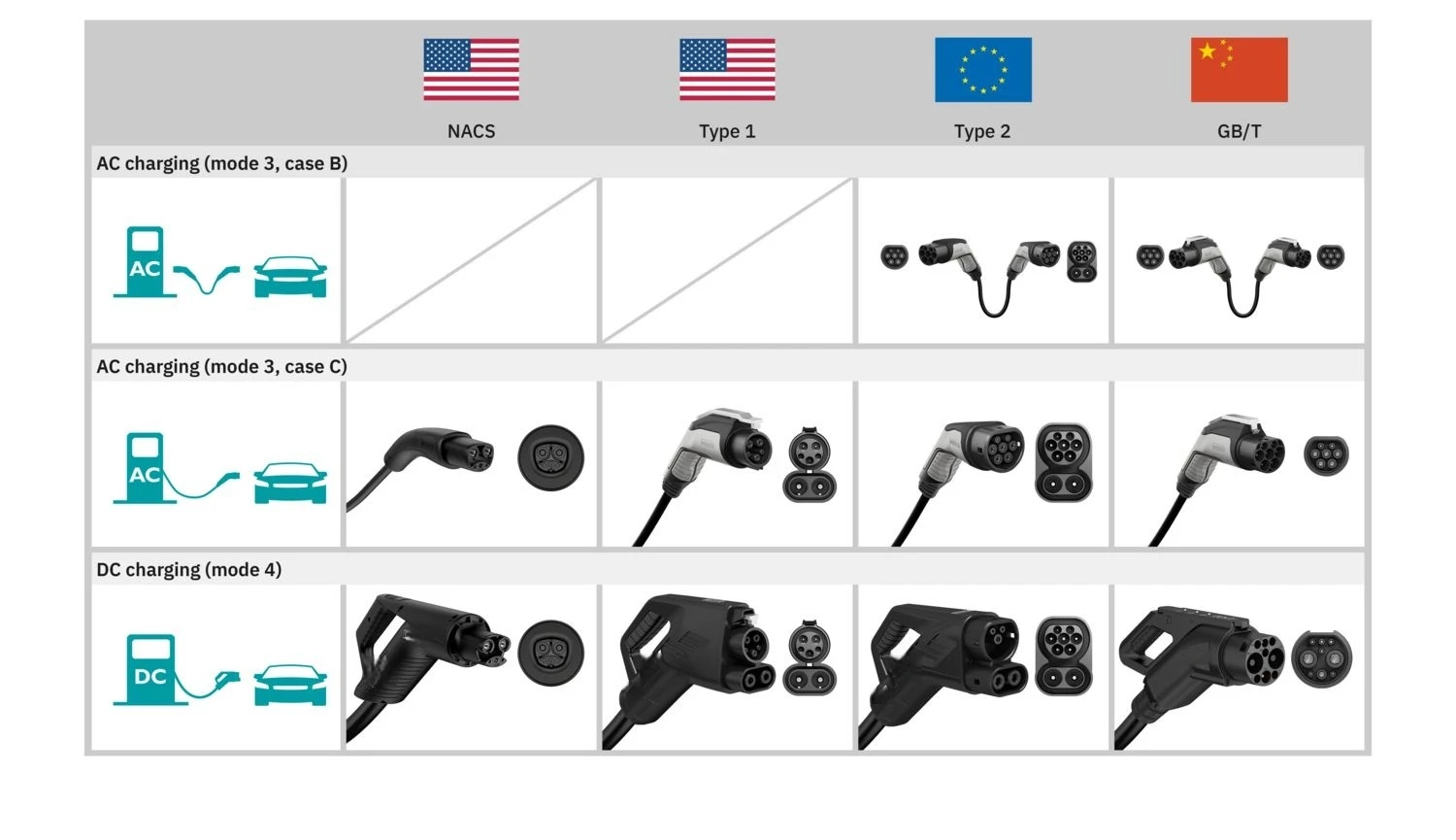
Quick Guide: Know Your Charging Port
Before troubleshooting, make sure you're using the right plug! Charging standards vary by region, and forcing an incompatible connector can cause severe damage.
China: Uses the GB/T standard for both AC (slow) and DC (fast) charging.
North America: Primarily uses NACS (Tesla's standard, now becoming the universal norm) and Type 1 (J1772) for older EVs.
Europe: The Type 2 (Mennekes) connector is the standard for AC charging.
Note: These connectors are physically different and not interchangeable. Always double-check compatibility, especially when traveling or buying second-hand equipment.
The Bottom Line
A well-maintained charger is the key to stress-free EV ownership. By mastering these basic troubleshooting steps and keeping up with simple maintenance, you'll save time, money, and headaches.
When in doubt, play it safe. If you encounter a complex fault or suspect a safety hazard, stop using the charger and reach out to a certified professional.
Need help with installation, maintenance, or troubleshooting? Feel free to reach out to our team-we're here to keep you moving!
→ Wechat/whatsapp: +86 189 6895 8968
Email: sales03@chinachuhan.com


